
Demo · a scripted agent session
Watch your AI agents at work.
Waterline by Ascenda is a free macOS screen saver that turns Claude Code, Codex and Cursor activity into water. As your agents work, the water rises. Events send ripples across the surface.
Runs locally on your Mac. No account.
For Macs with Apple silicon (M1 or later).
The installer puts one copy in /Library/Screen Savers, so macOS asks for your password once. A per-user copy won't stay selected on Sonoma or Tahoe.
How to turn it on in System Settings
- Open System Settings → Wallpaper and click the Screen Saver… button. On Sonoma and Sequoia, open System Settings → Screen Saver instead.
- Set Use Screen Saver to Custom (macOS 26 Tahoe only).
- Choose Ascenda Waterline from the Other list, then click Done.
The preview in System Settings stays still. The water moves once the saver itself runs.
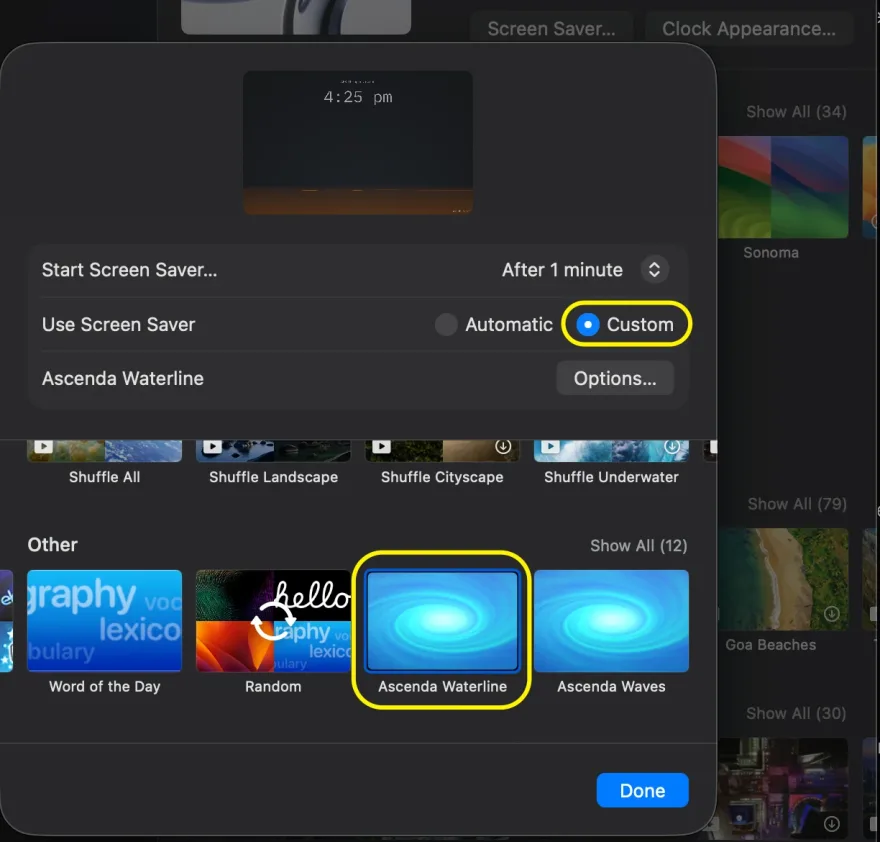
On Tahoe, this opens the Wallpaper pane from Terminal:
open "x-apple.systempreferences:com.apple.Wallpaper-Settings.extension"Free, under the MIT licence.
Start with water. Add your agents.
Install the screen saver, connect your agents, then add Ascenda Flow for colour.
Waterline
Free
Water and a clock. Install it, then turn it on in System Settings. Without collectors, the water rests. The steps are above.
Connect your AI agents
Free
Watch the water rise. Install the collector for each agent you use. The water rises as they work, and failures and context compactions send ripples across it. Waterline scales to your typical activity over seven days.
Run the command in Terminal. It needs Node 20 or newer. If node -v doesn't work in Terminal, install it from nodejs.org first.
npx @ascenda-one/claude-code-hooks setup --no-pairOr the Claude Code plugin, claude plugin install ascenda@ascenda-one. One or the other: both registers every event twice.
Installed before 0.1.34? Run it again.
Add Ascenda Flow
Early access
Give the water colour. Flow measures your workload against your usual day and tints the water to match.
Explore Ascenda FlowAscenda Flow is available to teams in our benchmark study. Apply to join.
Height shows agent activity. Colour shows workload. Your check-ins calibrate the reading.
How Waterline tracks activity
Lightweight local collectors pass activity from Claude Code, Codex and Cursor to Waterline. With collectors alone, Waterline sees activity while the screen saver runs, plus each agent's state from the last half hour. Ascenda Flow tracks activity throughout the day, including while the screen saver is off.
Questions
Why not just use caffeinate?
If all you need is your Mac awake while an agent runs, use caffeinate: caffeinate -i -w <pid> is one line and needs no install. Waterline answers a different question, which is whether your agents are still working, and you can read the answer from across the room.
Does Waterline keep my Mac awake?
No. The saver holds no power assertion: it's just a screen saver, and your Mac sleeps on its usual schedule. If you also run Ascenda Flow, choose Step Away from its menu bar icon before you leave. Flow keeps the Mac from sleeping while your work is still running, then lets it sleep once the work goes quiet. Your display may still turn off. If you only need the Mac awake, caffeinate -i in Terminal does that without installing anything.
Does Waterline send any data?
No. The screen saver has no network code. It opens no network connections and only reads data already on your Mac: collector activity arrives over a local Unix socket, and Ascenda Flow, if you run it, shares its reading through a local file. There are no analytics, crash reports or update checks. The collectors are a separate install. What they record, and where it goes if you pair them with Ascenda Flow, is on /trust.
Is Waterline open source?
The collectors are; the screen saver isn't. The hooks that feed Waterline from Claude Code, Codex and Cursor are open source under the Apache 2.0 licence, on GitHub. Waterline itself is free under the MIT licence, but we distribute it as a signed binary and its source isn't public. The licence lets you use, copy and redistribute it. To check what it does on the network, a firewall such as LuLu or Little Snitch will show it opens no connections. The full licence is at /waterline/licence.
What does Waterline do with nothing connected?
It shows still water and a clock. With no collectors and no Ascenda Flow, the water rests and doesn't pretend to track work. Ripples and pops only appear when something real happened: a tool failure, a context compaction or a session ending.
Which AI agents does it work with?
Claude Code, Codex and Cursor. Each needs its own collector, installed with one npx command listed on this page. Other agents aren’t supported yet.
Will it drain my battery?
We've not seen any noticeable drain. It's optimised for performance: the water is drawn with Metal, redraws only when the surface moves, and halves its frame rate when the water is calm. Like any screen saver, it only runs while the screen saver is showing.
Why does the installer ask for my password?
It installs one copy in /Library/Screen Savers, which needs admin rights. A copy installed for one user won't stay selected on Sonoma or Tahoe: System Settings accepts the choice, then reverts to a stock screen saver.
Is it signed and notarized?
Yes. The screen saver and its installer are signed with a Developer ID and notarized by Apple. The signing developer is Envisage Software Pty Ltd. Ascenda One Pty Ltd holds the copyright.
Does Waterline update itself?
No. A screen saver has no background process to update from, so the version you install stays as it is. New releases are listed under Versions on this page, and the mailing list announces them.
How do I uninstall it?
Choose a different screen saver in System Settings, then delete Waterline.saver from /Library/Screen Savers. macOS asks for your password. Remove the collectors through the tool you installed them with.
Why is it free?
Waterline is how we introduce Ascenda Flow, our app for engineers who work with AI agents. Waterline is complete without Flow and stays free. Flow adds colour: it tints the water by your workload. It also has Step Away mode, which keeps your Mac awake while your agents are still working and lets it sleep once they go quiet.
Versions
- 0.8.2 · current
- 0.8.1
- 0.8.0
- 0.7.7
Waterline doesn't update automatically. New releases are listed here, or join the mailing list to hear about them.
Hear when a new version lands
Leave your email and we'll tell you when there's a new release.
Support
Something wrong, or a question? Send us a support request. We reply by email. Tell us which version you're on.